Navigation:  Customers > Open Customer > Customer Actions > Customer Correspondence > Open Customer Email Correspondence >

Email Correspondence Actions

Previous topic Next topic JavaScript is required for the print function Mail us feedback on this topic! Mail us feedback on this topic!  


Content Tab - Actions:


Menu Items:

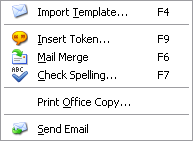
Import Template...Import template (F4) (see - Letter Templates).
Insert Token...Insert mail merge token (F9) (see - Tokens).
Mail MergePerform mail merge (F6).
Check Spelling...Check spelling of correspondence (F7) (see - Check Spelling).
Print Correspondence...Print correspondence.
Print Office Copy...Print an office copy of the correspondence.
Send emailSend email.


Links Tab - Actions:


Menu Items:

Print Correspondence...Print correspondence.
Print Office Copy...Print an office copy of the correspondence.
Send EmailSend email.


HTML Tab - Actions:


Menu Items:

TableContains table commands.
Insert Hyperlink...Insert hyperlink (see - HTML Hyperlink properties).
Hyperlink Properties...Open hyperlink properties (see - HTML Hyperlink Properties).
Insert Picture...Insert picture (see - HTML Picture Properties).
Picture Properties...Open picture properties (see - HTML Picture Properties).
Insert HTML CodeInsert HTML code from the clipboard.
Copy HTML CodeCopy HTML code to the clipboard.
Show BreaksShow sentence and paragraph breaks.
Browser BehaviourBehave like a browser.
RebuildRebuild HTML email.
Print...Print HTML email.
Send EmailSend email.


HTML Tab - Actions - Table:


Menu  Items:

Insert TableInsert table.
Insert RowInsert a row into the selected table.
Insert ColumnInsert a column into the selected table.
Delete RowsDelete the highlighted rows.
Delete ColumnsDelete the highlighted columns.
Delete CellsDelete the highlighted cells.
Merge CellsMerge the highlighted cells.
Split CellsSplit the highlighted cells.
Show BordersShow table borders.


Attachments Tab - Actions:


Menu Items:

Print correspondence...Print correspondence.
Print Office Copy...Print an office copy of the correspondence.
Send emailSend email.


Toolbar:

Insert mail merge token.
Perform mail merge.
Check spelling of correspondence.
Print correspondence.
Send email.


TIP

Depending on which tab is selected, determines which actions menu is shown.


Page url: http://help.moveadminister.co.uk/customercorrespondenceemailactions.htm