|
Navigation: Quotations > International Quotations > International Consignment > Open International Consignment > International Consignment - Destination |

|

|

|

|
|
Navigation: Quotations > International Quotations > International Consignment > Open International Consignment > International Consignment - Destination |
|
|
|
|

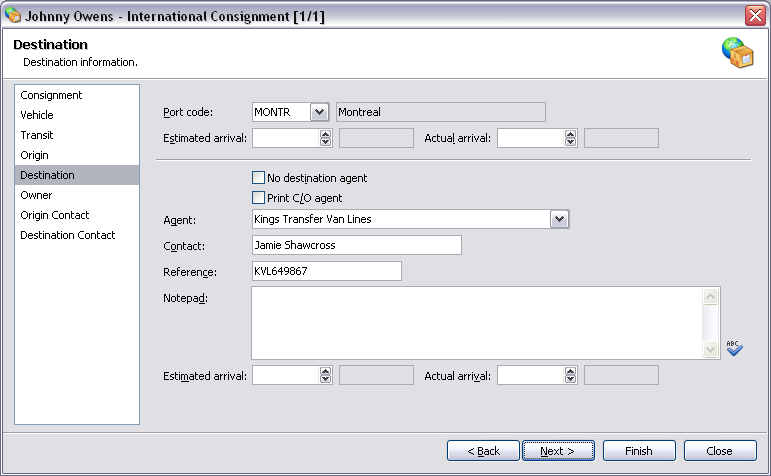
Destination Information Fields:
| Port code | Destination port code and description of port code. |
| Estimated arrival | Estimated port arrival date and day of week. |
| Actual arrival | Actual port arrival date and day of week. |
| Cleared | Date cleared and day of week. |
Destination Fields:
| No destination agent | No destination agent. |
| Print C/O agent | Print care of destination agent. |
| Agent | International destination agent. |
| Contact | Destination agent contact name. |
| Reference | Destination agent reference. |
| Notepad | Destination agent notepad. Press the  button to check spelling of notepad. button to check spelling of notepad. |
| Estimated arrival | Estimated destination arrival date and day of week. |
| Actual arrival | Actual destination arrival date and day of week. |
| Back | Return to the previous page. |
| Next | Move to next page in the sequence. |
| Finish | Close window and save any changes you have made. |
| Close | Close window. |
TIP Date cleared will only show if the type of consignment is import. You can spell check the destination notepad by pressing F7. To add a new port to Move Administer, simply enter the new port code into the port field and press Tab, this will then open the default Port form (see - Open Port). |
Page url: http://help.moveadminister.co.uk/wizardinternationalconsignmentdestination.htm
